The administration app for clubs, groups, teams and clubs.
Get started now
Vereinsplaner adapts to your club. Regardless of whether you have 25, 250 or 2,500 members — we have the right package for you.
The prices are for individual clubs. Subscriptions are billed annually in advance. Vereinsplaner can be fully tested 1 month in advance. Link to the entire feature list. Explanation of Prices & packages as a video.


Get your first 6 months free with the code VP50DACH.
Save not only time, but also money!
*Valid when you purchase the first package with a duration of 12 months.
These types of people are all those who, for example, are managed in master data, for whom prescriptions can be generated, or for whom appointment attendance is created. These people have no direct access to Vereinsplaner (with their own account) or only after they have been actively invited to the club.
People with accounts are those who actively have their own access to Vereinsplaner. Be it as a board member, but also trainers who lead groups. Or even active members who want access to appointments, news and the chat.
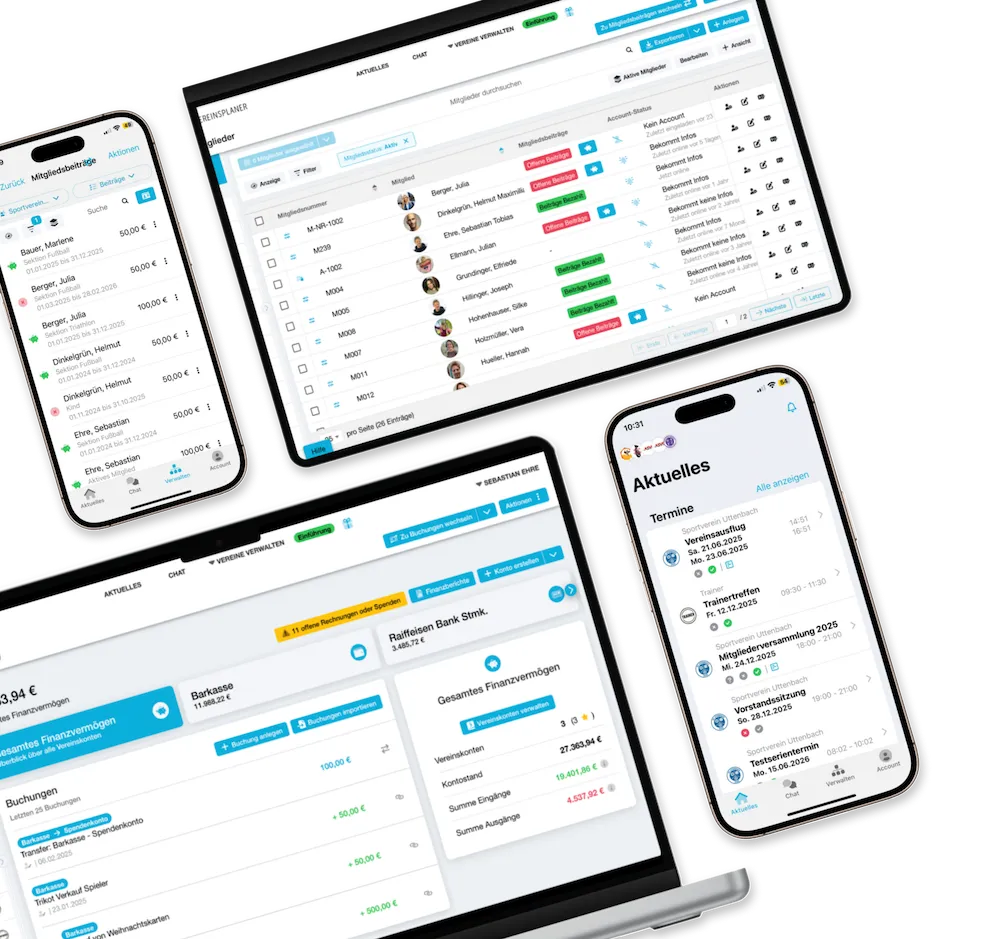
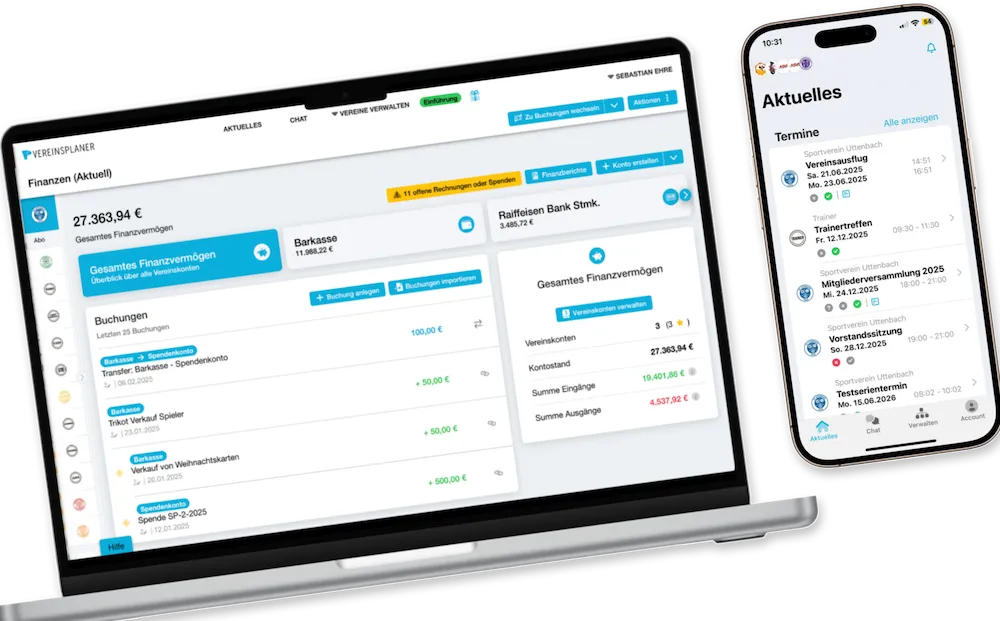
All device support in one all-in-one tool.
In addition to the club, depending on the package, you can create a certain number of subgroups, which serve as individual data and information rooms. In addition, a club and group hierarchy can be created here in club settings.
Server location in Germany at Hetzner GmbH.
You can easily create your own club and group hierarchy. Here you can arrange your groups and subgroups hierarchically so that data such as e.g. authorisations for individual trainers or group leaders can be assigned and restricted. In addition, data flows from a main group can also be sent to other hierarchically lower subgroups at the same time to optimise the data flow.
Authorizations can be assigned to individual processes (features), at club levels but also at group/division levels, so that data protection is always guaranteed and people only have access to the data they are allowed to access.
The groups/sections you have created can be easily arranged into the desired hierarchy using drag & drop. This hierarchy can be tailored to suit your club perfectly.
Name, detailed description, club type, ZVR number, VAT number, contact email and logo can be stored.
Numerous club details, such as the location, can be stored in the club's master data. If desired, this data can be automatically retrieved and displayed on documents, for example when creating documents.
This is used, for example, for SEPA direct debits, letterheads in prescription documents and other functions to simplify document creation.
The master data can be edited and updated at any time.
Link the clubs' social media channels.
Currencies supported for payment and financial administration.
People are managed as master data, which can be used comprehensively in administration. Furthermore, additional data fields with individual additional information about members can be created.
Initial import of member data supported by our team based on a predefined structure.
Subsequent updates of member data by the customer.
Number of people who have the opportunity to actively participate with their own account in the respective package.
These individuals have adaptable administrative authorisations within the club. Additional authorisations for administration can be assigned in the individual groups/sections and on the basis of functions.
Authorized persons can edit master data at group level, with changes automatically synchronized with club level.
Parents or other authorized persons can connect multiple member accounts and manage them centrally. Ideal for kids or members without their own smartphone.
If members have left the club, their data can be archived and are no longer listed as members of the club.
Members can be assigned active member roles and positions, which also appear in the member administration and serve as a structure. These roles and positions exist individually for each club type.
Number of members in the club and individual sections, departments and groups based on gender and age.
Certain member data can be stored chronologically in the system in order to have a history of the member.
For each member, documents of up to 10 MB per document can also be stored in the master data. These are stored in the cloud and can be downloaded at any time.
These can be awarded at club or group level. Members can also be given permissions to manage individual groups. In this way, groups/section heads can be defined in order to divide up administration within the club.
Views are templates of the table overview that can be saved permanently so that you can quickly switch back and forth between views.
Export the data based on filtering/sorting in the table for your own purposes or the association.
Detailed filter and sorting settings, which can also be saved as a separate view.
These are master data fields specifically defined by the association, which can be added to the member administration. There are different field types that can be used and enable clear data management, which is individually tailored to your club.
Synchronization means that members can change data (e.g. telephone number) in their own account and this change is shown to the club as a suggestion in the member administration. The association can then simply accept the changes.
Membership is the legal relationship between the member and the club. These memberships can be defined by yourself. In addition, a tariff or membership fee can also be assigned to them, if desired.
Tariff classes represent the frequency in which membership fees are collected/paid.
The contribution levels can be set individually for each tariff class created.
With Vereinsplaner, you can automatically generate membership fee invoices based on created and assigned memberships and send them directly as PDF files.
These invoice documents can be customised individually by each club.
Prescriptions can be collected, sent individually or filtered by membership or payment status of the member.
Bank details collected to process SEPA, membership fees and invoices.
When importing data, the system checks directly whether the specified bank details exist/have been entered correctly to ensure correct data management.
Membership fees are recorded historically in order to have proof of payments made by members.
With Vereinsplaner, you can easily create a SEPA data carrier using the ‘contribution collection feature’, which can be easily imported into your bank. You also have the option of creating a data carrier for all members collectively or, using the filter and search function, only for specific memberships, contributions and members.
If discontinued - a membership does not have to be created/assigned every year, but is automatically renewed in the new club year.
Create and manage as many new membership forms as you like. For example, you can have a separate form for each group/section/department. Please note that activation per form has its own limits (see next point).
Active membership forms mean how many forms are currently active on the website or via a link. In other words, it can also be completed by interested people.
Master data fields, custom fields, logo, colour, text blocks and structure can be freely configured for each form.
Attach statutes & data protection regulations to new member forms
Option for clubs to share the forms with interested individuals. This can be done directly via a link or the club's website.
Information about membership requests sent by e-mail to member administrators for acceptance and rejection.
Accurate cash accounting provides a precise picture of your clubs's cash holdings. Digital accounting allows you to categorise entries and record them in the cash book.
Mobile access to all financial data anytime & anywhere, digitally upload invoices and create and track important transactions on the go.
Various reports, such as cash audit report, EAR report, EU report and general financial reports, are generated as PDF files with just a few clicks and can be used as full-fledged reports for cashiers.
Connect Vereinsplaner with your own bank accounts to benefit from efficient and fast financial management. Coverage of 97% of DE and AT banks.
At group level, selected accounts are approved for individual groups so that authorized people can manage accounting entries and invoices independently.
Independent import of accounting entries via Excel for clubs based on accounts is possible. (e.g. cash book, bank account, section account, etc.)
Write, print, and send invoices.
Issue, print and send monetary donations, donations in kind and service donations.
Create a donation report over a period of time with all donations received.
With two connected areas, you can easily keep track of things, manage your finances in a targeted manner and immediately see outstanding invoices & accounting entries.
In order to meet the needs of clubs, we offer various account plans. Clubs can select the chart of accounts that best suits their structure.
Accounts can be added or deleted individually to the selected chart of accounts, or a quick selection of the required accounts can be created.
This function provides an up-to-date overview of the financial situation of a club and makes it possible to meet payment deadlines.
Recurring events can be planned and organized more efficiently based on findings from past projects. Budgeting based on this.
Linking accounting entries to invoices enables clear documentation of transactions and facilitates accounting control.
Account transfers allow funds to be transferred between different financial positions or purposes
Cost centers in accounting make it possible to divide expenditure into different areas or departments. They help to monitor budgets and assess the profitability of individual areas or projects.
A cost center can be added to each accounting entry to enable DATEV exports, among other things.
The evaluation of cost centers is required for the preparation of reports and is essential for planning future expenditure.
Clear allocation of customers and suppliers to transactions helps to track invoices more easily and to keep track of them.
By assigning accounting entries to specific areas of the club, clubs can better track and analyse their income and expenditure.
Manage contacts in various mailing lists, such as members, sponsors, patrons, honorary members or helpers.
Number of individual emails that can be sent per club per month.
This function can be used separately in the club and also in all groups.
With the help of the newsletter kit system, you can easily create a newsletter and determine the appearance of it yourself using the modular elements. You can then send this newsletter as an email to all people involved (members, sponsors, sponsors, helpers,...). That's how you reach everyone!
Elements that can be used to build emails.
Possibility to preview emails before sending them.
Possibility to save emails as drafts or create them as templates.
Possibility to check emails in the form of a real test email before sending them.
Undeliverable email statistics.
Attach several documents with a total of up to 4MB in the emails sent out.
The appointment statistics can be filtered according to many parameters in order to create an analysis. These include, for example, which and how many members have seen the appointment, accepted, declined, read or not read it. These statistics can also be downloaded as an Excel or PDF file.
For appointments that have been created, you can set it so that members can accept or decline. You can view this list in your club. This allows you to always maintain an overview and better plan your club appointments.
With the help of the mobile app, active members can easily provide feedback on appointments, read them and accept or cancel them.
Attendance lists can be used to evaluate the attendance of club members at appointments over a specific period of time. This tool is perfect for trainers and group leaders who want to track attendance at their trainings/appointments or if, depending on attendance, certain matters in the club are financially billed or remunerated.
Each week, a preview is generated based on upcoming appointments, which can be automatically sent to you as a reminder in advance.
Appointments can be created which are repeated regularly (automatically). (e.g.: training every Monday)
News posts are self-created texts, which are displayed in each member's club dashboard and are intended to inform club members about news. News posts can also be easily created and received using the mobile app to keep all club members always up-to-date. News posts can also only be created for individual groups.
Which members can see, saw and read the news post and the respective number of members.
Information arrives via push notification or email. The news post itself is opened and displayed in Vereinsplaner.
Here, information such as item number, description, date of purchase, photo, etc. can be added and assigned to an inventory category
All relevant information about an item that is important for the loan can be entered here. These include, for example, availability, quantity, loan period and many more.
Depending on requirements, additional storage space can also be purchased separately.
For each group created, a data room is automatically created, which can also be accessed by individual persons using an authorization system.
It is possible to set up the club planner chat individually for the club and the groups. This means that different chat settings can be set in the individual groups. These range from deactivating the chat to deleting all messages and, in future, the option that only administrators in a chat room can write messages.
Pictures are currently being sent as document attachments. In the future, these should also be able to be sent using a preview.
In the anniversary and birthday calendar, the events are shown in chronological order. Birthdays are calculated based on data in member management and automatically displayed in the birthday overview.
The self-defined anniversaries are also automatically calculated in the member administration based on the date of membership and displayed in the anniversary and birthday calendar.
You can define for yourself which anniversaries are relevant in your club. (e.g.: 3-year, 5-year, 10-year anniversary of a member, etc.)
In the anniversary calendar, you can also filter by birthdays, only round birthdays and anniversaries to ensure clear administration.
In our help center, you will find detailed instructions on the various functions and their meanings in the club planner.
On our YouTube channel, you will find numerous videos that take you step-by-step through the club planner and his functions.
If you have any questions or feature requests, you can send an email to our support team at any time. A support ticket will be created and you will be answered within 1-3 business days.
The Vereinsplaner support team will assist you with the initial data import of your member data and carry it out.
Server location in Germany at Hetzner GmbH.
Zendesk AI chatbot to resolve queries outside of business hours.
AI telephone hotline to answer simple questions. Accessibility every day 0-24 hours.
General contact, such as feedback, requests, suggestions and support/questions, takes place exclusively in writing via our support email address.
Be part of over 15,000 clubs
Create your own club profile in just a few seconds, free of charge and without any risk. Test all the features for a month and see for yourself how great Vereinsplaner is. In the meantime, feel free to send us your requests, suggestions and experiences so that you can actively contribute to the further development of the platform in your best interests.